20260921-20261012 Lean 形式化證明的第一個訓練完成,yeah~ https://adam.math.hhu.de/
Blog
-
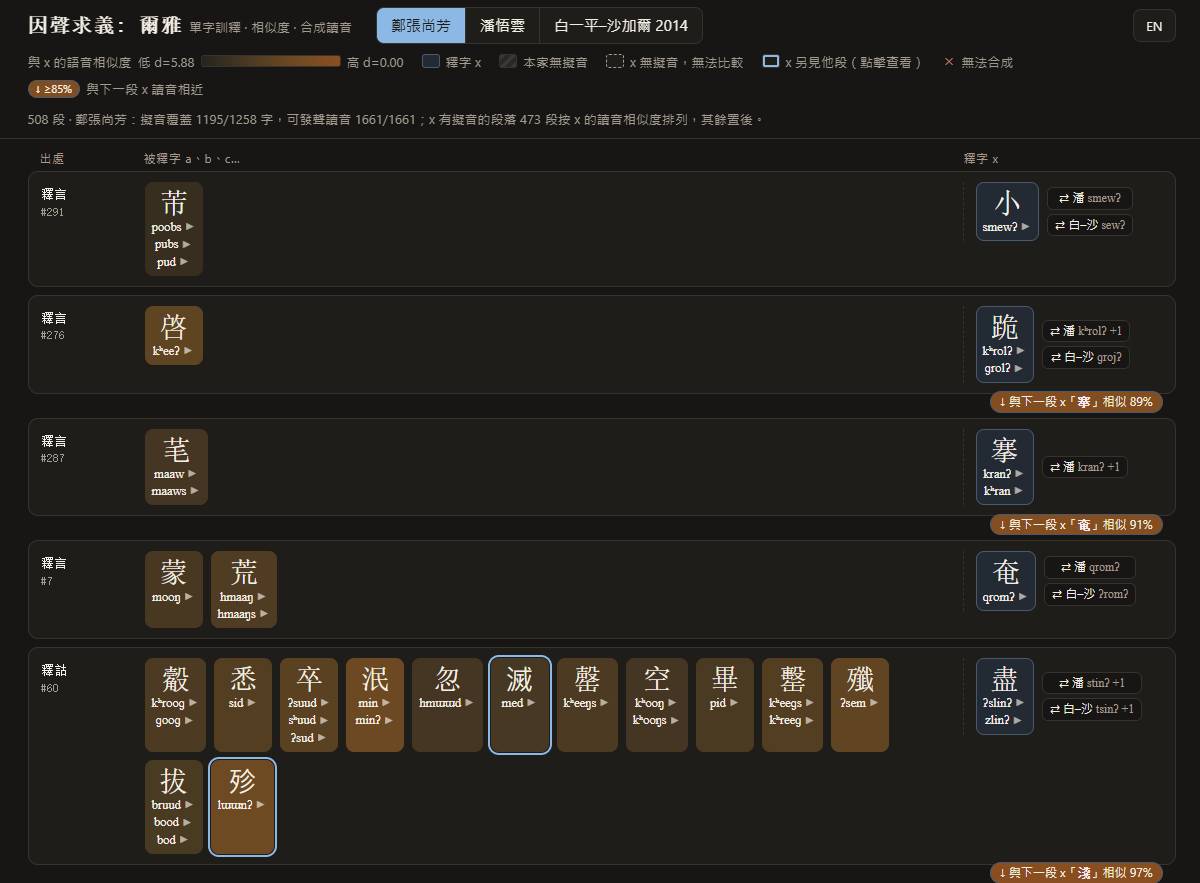
因聲求義: 爾雅
資料來源
- 文本:維基文庫《爾雅》,revid 9736004(2026-09-17T14:52:07Z),CC BY-SA 4.0。
- 收錄:「a、b、c…,x也」且 x 與所有被釋字皆為單字的分句 508 條(句子按「。」切分,可跨行;再按「;.:」切成分句);其餘 1294 個分句跳過 (句式不合 1142、x 多字 69、被釋字含多字 83)。
- 擬音:鄭張尚芳《上古音系》、潘悟雲《漢語歷史音韻學》、Baxter, William H., and Laurent Sagart. 2014. Old Chinese: A New Reconstruction 三家上古音,顯示經清洗的形式(去掉邊界號與不確定標記); 懸停可見原始形式與中古音。字形按原字精確匹配,異體不自動轉換。
相似度算法
- 相似度:panphon 加權特徵編輯距離(除以較長形式的音段數),同一家內計算、不跨家比較;多音字取所有讀音組合中的最小距離。 底色為本家全部被釋字距離的 min–max 歸一化(越深越近)。
- 排序:段落距離 = 兩段 x 讀音集合間的最小距離;complete linkage 層次聚類 + 最優葉序。 相鄰兩段的 x 相似度不低於 85% 時,在兩段之間標出。
IPA 語音合成
- 讀音:ipa-pron(Praat KlattGrid 規則合成)逐讀音預合成、同形共用。✕ 表示該形式無法合成:目前只有白–沙清洗後沒有元音的少數形式。
說明
相似度只衡量擬音形式的接近程度,高相似不等於同源或音變關係;合成音頻是音系示範,不是學術證據。
-
面向自身的产品
之前好多年,总希望设计面向互联网用户的产品,在搜索引擎和各种入口中,平等地竞争,并获得访问量反馈。慢慢发现自己认为有用、日常使用的产品,不一定其他人会喜欢。另一方面,在和美股相关的数据分析和算法实践里发现,平等竞争和凭借知识盈利的思想,除了产品设计外,美股是一个反馈更直接的场域。
但喜欢制作/制造这件事,似乎是从小就停不下来的表达方式。既然不面向竞争,不面向流量,不面向「ta 者」。做产品就变成了完全面向自身的问题、生活、需求、取向。
最近一段时间维护的两个产品:
一个是对 huggingface papers https://huggingface.co/papers 页面做的中文概述:https://paper.oopus.info/. 是面向自己尽量每周读一次 huggingface weekly paper 的需求。从项目开始至今,保持至少每周更新一次。
另一个产品也是会持续维护的,pdf 无损压缩项目 https://github.com/sudoghut/pdf-optimizer. 缘起是日常用 Abbyy 或其他 PDF 制作工具的时候,常常会把一个尺寸小的原始 PDF,转成更大但质量并没有任何改变的 PDF. 希望一个案例一个案例积累关于 PDF 中冗余信息的知识。
六月之后,七月北大某个职位的招聘和培训闹得鸡飞狗跳。八月开始,在上课之前一周半才知道自己要做东南大学四周七十二个小时的工作坊(这个工作坊本身是很好玩,但临场准备,加上 Kimi 公司无法提供配合,临场(第一次课之前四十八小时)把模型全面转向 Minimax. MiniMax 真好用!),设计起来也是耗费不少心力。很多自己的爱好和尝试都被迫暂停。Blog 也长时间没有更新。
八月中旬拔智齿之后,经历了两个礼拜的中度感染,从牙龈肿块到淋巴管暴起,这段时间医生用了替硝唑和头孢,吃了整整一个礼拜。这段时间刚好作为由头来戒酒,戒晚睡、晚起,戒工作之外太多工作思绪的牵连,戒睡前刷 B 站,这些一直想要戒,但难以戒除的日常。
另一方面,拔完牙头吃了两天藕粉,对一直以来希望减脂又减不了一点儿的困局也一下子找到了思路。到今天,在这个思路下,已经减了十二斤,耶~
好像新版本的自己又快要上线了。希望这以后能完全切开工作和非工作时间。非工作时间里,自己就是自己世界中决断和探索一切的王。
-
“连不上”不一定是“被墙”:Xray 升级后,旧客户端内核握不上 REALITY
一个长期稳定的自建 VLESS + REALITY 节点,某天开始客户端全线 timeout。第一反应通常是“这个 IP 被 GFW 封了”——于是换网络、加中继、甚至准备换 IP。但在我们这次的排查里,IP 并没有被封:真正的变化发生在服务端——Xray 被升级到了新版本,而手上的旧客户端内核(Clash 用的 mihomo)已经握不上它的 REALITY 了。
这篇文章只讲我们实际验证过的事实:怎么把“被墙”和“客户端不兼容”分开,我们试过哪些办法、结果如何,以及——同样重要——哪些我们并没有证实。
症状
- 原本稳定的节点,突然开始大面积超时。
- 换网络、换设备、换运营商,现象都差不多。
- TCP 端口不一定完全不通,但客户端就是连不上。
- 直觉上很像“IP 被盯上了”。
第一步:别急着判定“被墙”
关键的一点:“卡在 TLS / REALITY 握手”这个现象,被墙和协议不兼容都会产生,单看它分不出来。
还有两个常见误区要避开:
- 普通 TLS 工具的失败不能当证据。对 REALITY 入站,
curl/openssl s_client本来就完不成握手(REALITY 会拒绝非授权握手),它们报错是正常的。 - 要看内核自己的日志——
xray/mihomo/sing-box的连接日志,而不是外部工具的输出。
既然现象分不出来,就得做对照实验,把变量一个个拿掉。
决定性证据:在服务端本机走回环,换内核对照
这是整次排查里最有说服力的一步,也是我们真正确证的事实。
做法:在服务器本机,用不同的客户端内核、同样的参数,去连本机的
127.0.0.1入站。这条路径不出公网、不经过任何跨境链路,等于把“网络封锁”这个变量直接拿掉,只剩下“客户端内核”这一个变量。同一台机、同一时刻、同一个
127.0.0.1:443,结果是:客户端内核(回环连本机入站) 结果 xray-core(与服务端同源、同版本)✅ 握手成功 mihomo(与客户端同版本)❌ 握手失败 结论很直接:这是“客户端内核 ↔ 服务端 Xray”的兼容性问题,跟 IP、跟网络封锁无关——因为这条路径根本没碰网络。回头一查,服务端的 Xray 确实在不久前被升级到了一个很新的大版本;而我们手上的旧客户端内核(至少本次测试的 mihomo / sing-box)跟不上它的 REALITY 了。
这也把“是不是被墙”摘了出去:回环这条路根本不出网络,等于把“封锁”这个变量排除在外。在我们这台机器上 IP 也确实没被封,于是问题就锁定在内核兼容性上。
我们在客户端侧试过的办法,都没把它救回来
很多人的第一反应是“升级一下客户端就好”。我们试了,对 mihomo / sing-box 不管用。以下都在服务端回环 / 链路上实测过:
尝试 结果 xray-core(直连 / 回环)✅ 成功(唯一能过的) mihomo最新 stable + 最新 Alpha❌ 失败 mihomo,7 种 uTLS 指纹逐个试❌ 全失败 mihomo,显式打开support-x25519mlkem768开关❌ 仍失败 sing-box(较新 uTLS 的版本)❌ 失败 在我们这组测试里,唯一能稳定握上手的就是
xray-core,而且是在直连 / 回环下。所以实用的结论是:如果你直连节点、用的又是 Clash / mihomo,单纯升版本(包括打开那个常被怀疑的后量子开关)在我们这里没救回来——换一个 xray-core 内核的客户端,是我们这里唯一验证有效的办法。如果你是经中继(proxy chain)连节点:客户端这条路走不通
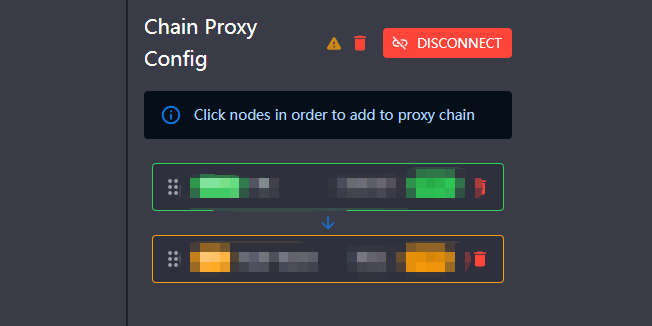
有一类很常见的用法:节点是一个固定的境外出口,永远从一个墙外的前置跳板接进去,也就是
本地 → 前置跳板 → 境外出口这条 proxy chain。先说清楚:REALITY 本身并不是“不能被中继”——Xray 的
dialerProxy本就支持链式拨号,把 REALITY 套在前置代理后面是常见用法。但在我们这台升级后的服务器上,我们试过的组合都没能让 REALITY 经中继跑通:- 把
xray-core的 REALITY 经前置跳板转发到服务端——握手没成功(试过的两条中继表现还不一样:一条直接 EOF,一条到达服务端鉴权阶段后被判无效连接)。 - 但同一条中继转发普通 TLS 到同一端口却能通——说明中继能到达服务端、也扛得住 TLS——至少能把问题收窄到“这版 REALITY 经该中继转发”这一段(确切卡点我们没独立证实,见下文)。
- 我们把客户端这边能试的组合(不同内核单独及混用、不同指纹、那个后量子开关)都试了,没有一个能让 REALITY 经中继接通。
所以在“必须走中继”的场景里,客户端这条路我们没能走通。对症的做法是从服务端入手:把出口那一跳换成一个能被正常中继的协议(纯 TCP、两端内核都支持就行)。换掉之后,经前置跳板接入即可恢复。
顺带排除一个坑:在我们试过的 TCP 类中继上,Hysteria2 这类 UDP 协议也不合适。它是 UDP/QUIC,经 TCP 类中继要做 UDP-over-TCP 封装,而我们试的商业中继并不还原这种封装,照样超时。UDP 系协议(Hy2 / TUIC)更适合直连,要这样经 TCP 类中继转发往往不顺。
我们没有证实的部分(同样要讲清楚)
为了不把推测当结论,下面这些我们并没有坐实:
- 没有证实“元凶就是后量子”。社区里常见一种归因:把这一轮“Xray 升级后旧客户端连不上”算到新版默认带上的后量子能力头上(如
X25519MLKEM768密钥交换、以及可选的ML-DSA-65认证)。这与我们看到的现象不矛盾、也是重点怀疑对象;但我们这台服务器的入站当时其实没有显式的后量子字段,而且把客户端的support-x25519mlkem768打开也没用。所以我们能下的最稳结论只到——“新版 Xray 的 REALITY 与旧客户端内核不兼容”,至于具体卡在哪个特性,没有独立验证。 - 没有证实 REALITY 经中继失败的确切机理。一个合理的猜测是:REALITY 的鉴权信息嵌在 ClientHello 里、对 TCP 分帧敏感,经中继重新分段后被破坏了——但这只是推断,我们也没排除中继自身实现的影响。
结论:一套可复制的判断流程
- “卡在握手”既不能证明是 GFW、也不能证明不是——别靠现象拍脑袋。
- 在服务端本机走
127.0.0.1回环、换不同客户端内核对照:如果结果按内核分成败,就能确认存在协议兼容性问题,且这一部分换 IP、加中继都解决不了(这条路径不碰网络,封锁与否被排除在外)。 - 如果只有
xray-core能连,多半是服务端 Xray 升级后、旧客户端内核没跟上。直连场景 → 换 xray-core 内核的客户端;走中继场景 → 从服务端把出口换成能被中继的协议。
一句话:这类故障也许不是“IP 被墙”,而是“服务端升级了、客户端没跟上”。在下结论、急着换 IP 之前,先用回环对照把“协议不兼容”这条单独验掉。
参考资料
- XTLS / Xray-core, PR #4915 “REALITY protocol: Add optional Post-Quantum ML-DSA-65 verification”(后量子认证的来源)
https://github.com/XTLS/Xray-core/pull/4915 - XTLS / Xray-core,
transport/internet/reality/reality.go(main分支会漂移,复核时建议钉到具体 release tag)
https://github.com/XTLS/Xray-core/blob/main/transport/internet/reality/reality.go - MetaCubeX / mihomo v1.19.9 release(加入
support-x25519mlkem768)
https://github.com/MetaCubeX/mihomo/releases/tag/v1.19.9 - sing-box documentation, “TLS Shared Fields”
https://sing-box.sagernet.org/configuration/shared/tls/ - NIST FIPS 203, “Module-Lattice-Based Key-Encapsulation Mechanism Standard”
https://csrc.nist.gov/pubs/fips/203/final - NIST FIPS 204, “Module-Lattice-Based Digital Signature Standard”
https://csrc.nist.gov/pubs/fips/204/final
致谢与署名
本文的排查与初稿由 Claude Code 完成:复现“全线 timeout”、区分“TCP 连通性”与“握手失败”、在服务端走
127.0.0.1回环用不同客户端内核做对照实验,把病根定位到「新版 Xray REALITY 与旧客户端内核不兼容」,并实测发现这版 REALITY 经我们试过的中继转发都跑不通(同一条中继转发普通 TLS 却能过)。站点维护者(本博客作者)做了几处关键决断与一手事实纠正——尤其是坚持“这个 IP 其实没被封”的判断(正是它把方向从“绕中继对抗封锁”拉回到“换协议 / 对齐版本解决兼容性”),并在 Windows / iOS 上做了实测验证。
技术准确性、逻辑严谨度与引用规范的审校由 codex(OpenAI Codex) 完成:对论断逐条复核(包括把若干超出证据的措辞收紧),并校准了术语与参考文献。
-
一个甩不掉的红叉:深挖 Dropbox 文件夹图标上的”幽灵”同步错误
一次完整的取证式排查记录:从”重启大法”一路打到 Dropbox 的内部 SQLite 数据库,推翻三个看似正确的结论,最后用一条官方排障命令收尾。
症状
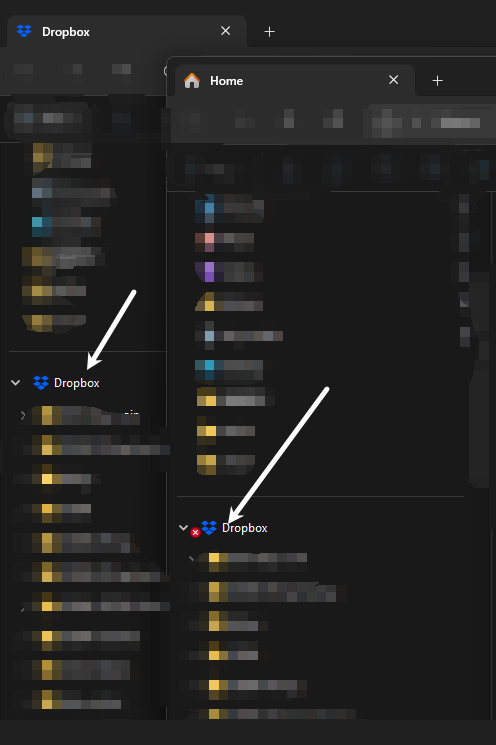
Windows 11 的文件资源管理器左侧导航栏里,Dropbox 文件夹图标上挂着一个红圈白叉(Dropbox 的”同步错误 / 无法同步”徽标)。但诡异的是:
- 右下角系统托盘里的 Dropbox 图标完全正常;
- Dropbox 自带面板底部明确写着 “✓ Your files are up to date”(文件均为最新);
- 这个红叉已经持续很多天,期间重启过电脑很多次,纹丝不动。
一句话:Dropbox 自己说一切正常,但文件夹图标却在报错。 到底谁在撒谎?
一个关键观察(也是整场排查的起点):同一个 Dropbox 文件夹,在两个不同的资源管理器窗口里,一个有红叉、一个没有。同一对象在不同窗口显示不一致,直觉上指向”缓存 / 刷新问题”而非”实时真实状态”。后面会看到,这个直觉对了一半,又错了一半。
背景知识:文件夹图标上的”徽标”是怎么来的
Windows 资源管理器允许第三方通过 Shell Icon Overlay Handler(外壳覆盖图标处理器) 在文件/文件夹图标上叠加一个小角标。Dropbox、OneDrive、Google Drive、TortoiseGit/SVN、各种网盘都靠它来画”已同步 / 同步中 / 出错”的小图标。
但这里有一个臭名昭著的坑:Windows 最多只认 15 个覆盖图标处理器。
一个容易混淆的点:这台机器上其实有两套图标系统并存。 Dropbox 开了 Files On-Demand(基于 Windows 的 Cloud Files / 云文件 API),文件级的”绿勾(已同步)/ 白云(仅在线)”是 Cloud Files 的 hydration 状态图标画的,不受这 15 个槽位限制;而文件夹级的”同步中 / 出错”角标(至少在本机这套环境里)走的仍是上面这套老式 Shell 覆盖图标处理器(
DropboxExt)。本文要追的那个红叉属于后者,所以下文只沿覆盖图标处理器这条线走。这个限制来自底层 image list 最多只能有 15 个 overlay mask,从 Windows XP 时代硬编码至今,Raymond Chen 在《The Old New Thing》里专门解释过它的来龙去脉(devblogs.microsoft.com)。注册表位置在:
HKLM\SOFTWARE\Microsoft\Windows\CurrentVersion\Explorer\ShellIconOverlayIdentifiers HKLM\SOFTWARE\WOW6432Node\...\ShellIconOverlayIdentifiers普遍观察到的行为是:Windows 按键名的字母序枚举、只保留前 15 个,后面的静默丢弃。(15 这个上限有 Raymond Chen 的文章背书;而”按键名排序加载”更多是业界长期观察到的实现行为,并非官方逐字承诺的契约——下文我会用实测而非这条规则来下判断。)于是各家应用为了抢进前 15,纷纷在自己的键名前面加前导空格(空格的 ASCII 比字母小,排序靠前)——这是一场公开的”军备竞赛”,ownCloud 的开发者甚至专门提了 issue 吐槽(owncloud/client #3141),也有不少博客教你手动加空格给自己常用的应用提权(garethjmsaunders.co.uk、itwriting.com)。
记住这个机制,因为它马上要把我带进第一个(错误的)结论。
第一回合:当成图标缓存花屏 —— 失败
最常见的”图标错乱”原因是 Windows 的图标缓存损坏。标准疗法是重启资源管理器、重建图标缓存数据库:
# 重启 explorer
Stop-Process -Name explorer -Force; Start-Process explorer

# 彻底重建图标缓存
Stop-Process -Name explorer -Force
Remove-Item "$env:LOCALAPPDATA\IconCache.db" -Force
Remove-Item "$env:LOCALAPPDATA\Microsoft\Windows\Explorer\iconcache_*.db" -Force
Start-Process explorer
删掉了 16 个
iconcache_*.db,重启。红叉纹丝不动。结论:它不是 Windows 图标缓存花屏。 一个能扛过图标缓存彻底重建的角标,要么是实时画上去的,要么藏在别处。
第二回合:15 个覆盖图标名额被吃满 —— 看似铁证,其实站不住
我把
ShellIconOverlayIdentifiers下的所有处理器列出来并按加载顺序排序,再逐个解析到它们背后的 DLL:槽位 键名 归属 1–7 OneDrive1–7微软 OneDrive( FileSyncShell64.dll)8–14 .WorkspaceExt0–6百度网盘( YunShellExtV164.dll,用”前导空格 + 点”伪装,抢占最高优先级)15 AccExtIco1Adobe CoreSync 16–27 DropboxExt01–10❌ Dropbox,全部排在 15 名之外 OneDrive 占 7 个 + 百度网盘占 7 个 + Adobe 占 1 个,正好吃满 15 个名额,Dropbox 的 10 个处理器一个都没排上。看起来完美解释了一切:Dropbox 画不出正确徽标,旧红叉也清不掉。
实际把注册表项按键名排序后的样子(为抢前 15,各家都在键名前堆前导空格 / 加点号):
[排进]  1.'       OneDrive1'  … 7.'       OneDrive7'        (FileSyncShell64.dll)
[排进]  8.'      .WorkspaceExt0' …14.'      .WorkspaceExt6'  (百度网盘 YunShellExtV164.dll)
[排进] 15.'   AccExtIco1'                                    (Adobe CoreSync)
[出局] 16.'   DropboxExt01' …25.'   DropboxExt10'           (Dropbox ← 全部落在 15 名之外)
[出局] 26.'  115ErrorOverlayIcon' …                         (115 网盘)
这正是网上铺天盖地的那个解释——”装太多网盘把 Dropbox 挤掉了”(itwriting.com、CentreStack、Wikipedia: List of shell icon overlay identifiers)。
但我没有就此收手。 因为有个细节对不上:如果 Dropbox 的处理器没被加载,它连红叉都画不出来才对。于是我去查 explorer.exe 当前到底加载了哪些 DLL:
Get-Process explorer | ForEach-Object { $_.Modules } |
  Where-Object { $_.FileName -match 'DropboxExt|FileSyncShell|YunShellExt|CoreSync' } |
  Select-Object -Expand FileName -Unique
实测输出(只列命中的模块):
Dropbox  : 已加载 -> C:\Program Files (x86)\Dropbox\Client\DropboxExt64.95.0.dll
OneDrive : 已加载 -> C:\Program Files\Microsoft OneDrive\...\FileSyncShell64.dll
Baidu    : 未加载
Adobe    : 已加载 -> C:\Program Files (x86)\Common Files\Adobe\...\CoreSync_x64.dll
结果与”名额被吃满”的预期正好相反:
DropboxExt64.95.0.dll—— ✅ 已加载、活动中- 百度网盘
YunShellExtV164.dll—— ❌ 没加载(因为百度网盘进程当时没运行!)
反转: 百度网盘虽然霸占着注册表里的高优先级槽位,但它没运行,所以它的处理器根本没被加载(也就谈不上占用 overlay 槽)。”15 名额被吃满”这个流传最广的解释,在这台机器上根本不成立。
教训一:注册表里”占着名额”不等于”运行时真加载了”。至少在这台机器上,排在 16 名之外的
DropboxExt照样被加载进了 explorer 并在画角标——”名额被吃满”的解释在此不成立。(严格说,单凭”DLL 已加载”还不足以断言 Windows 的 15 计数规则,也不能证明别的 handler”让出了名额”;但第四回合会证明红叉确实是 Dropbox 实时画的,从而坐实它的覆盖处理器在正常工作。)要快速验证,直接看 explorer.exe 的已加载模块即可。既然 DropboxExt 是活的,那红叉就是 Dropbox 自己实时画的。问题升级为:Dropbox 为什么坚持认为根目录有错?
本回合小结 —— 观察到:
DropboxExt已加载、红叉仍在;排除了:”被挤出 15 名额导致画不出图标”这个解释(在本机);还不能证明:Dropbox 的”错误”判断到底源于真实同步问题,还是陈旧状态。
第三回合:desktop.ini 红鲱鱼
文件夹图标可以被自身的
desktop.ini静态指定。如果 Dropbox 在出错时往desktop.ini写了个”错误版”图标资源、修好后没改回来,那就能完美解释”持久且扛重启”。一查:[.ShellClassInfo] IconResource=C:\Program Files (x86)\Dropbox\Client\Dropbox.exe,-13001确实指定了自定义图标
-13001。我用PrivateExtractIcons(负数索引按资源 ID 提取)把它抠出来看:# PrivateExtractIcons 传负的 nIconIndex 时,按资源 ID 的绝对值提取 [IconRes]::Save("...\Dropbox.exe", 13001, "res_13001.png", 256)-13001是一个干净的蓝色 Dropbox 文件夹图标,没有任何红叉。所以desktop.ini是清白的,文件夹的基础图标正常,红叉确实是叠加在上面的动态覆盖,不是静态图标。教训二:
desktop.ini的IconResource=...,-N里的N是资源 ID(负号表示”这是 ID,不是序号”),Windows 的图标提取语义里负值通常被解释为资源 ID(而非从 0 起的序号)——这一点在ExtractIconEx/SHDefExtractIcon的官方文档里有明确说明。我用PrivateExtractIcons传负值做了验证性提取,取到的正是资源 ID13001对应的图标。
第四回合:注册表命名空间节点 + 一个幽灵副本
导航栏里的 Dropbox 项不是普通的”固定文件夹”,而是一个 命名空间外壳扩展(shell namespace extension),跟 OneDrive 一样,通过
HKCU\Software\Classes\CLSID\{GUID}+...\Desktop\NameSpace\{GUID}注册。一查,发现注册了两个都叫 “Dropbox”、都指向C:\Users\sudos\Dropbox的 CLSID:{9E639962-...}—— 当前生效(在Desktop\NameSpace里){E31EA727-...}—— 幽灵副本(不在NameSpace里,疑似重装/迁移残留)
为了判断红叉是”卡在这个外壳节点上”还是”Dropbox 实时喂的”,我做了一个删除—恢复对照实验(全程只改 HKCU、先
reg export备份、可逆):- 删掉幽灵副本
{E31EA727}+ 把活动项{9E639962}连定义带挂载点整个删除; - 重启 explorer → 侧边栏 Dropbox 项连同红叉一起消失;
- 从备份原样导回活动项;
- 重启 explorer → 红叉在节点一出现的瞬间又回来了。
这一步是决定性的:红叉不在注册表 / 外壳缓存里。 删除节点只是把”显示红叉的载体”拿掉了;载体一回来,Dropbox 立刻又把红叉喂上去。
教训三:想区分”显示层缓存卡死”还是”数据源实时输出”,做一次”删除载体—恢复载体”对照实验最干脆。
第五回合:翻 Dropbox 自己的数据库
既然是 Dropbox 实时输出”错误”,那它的依据在哪?我开始只读地翻 Dropbox 的本地状态(都不碰云端、不触发下载):
...\Dropbox\instance1\icon.db(81 MB) —— 名字很像”图标状态库”,但一看 schema 就排除了:键名是tpng<路径>_256、值是 Python pickle,这其实是缩略图预览缓存,与徽标无关。sync_history.db—— 近期 99 条事件全是正常的file/add|edit|delete · upload|download,零错误、零冲突,最近一次同步就在当天下午。sync_and_storage.db(127 MB) —— 只有一张storage_files表(Files-On-Demand 占位索引),根本没有”状态 / 错误”字段。到这里,Dropbox 所有可读的本地证据都在说”我很健康”。
第六回合:”仅在线”状态反推出真相
storage_files里 425,472 条记录,本地实际 406,481 个文件,其中 406,076 个是”仅在线”(online-only)占位符。“仅在线 vs 本地有内容”是靠 Windows Cloud Files 给占位符打的文件属性位数出来的(只读元数据,不触发下载):
# RECALL_ON_OPEN(0x40000) / RECALL_ON_DATA_ACCESS(0x400000) / OFFLINE(0x1000)
# 任一置位 = 该文件是"仅在线"占位符(内容在云端,本地已脱水)
attrs = entry.stat(follow_symlinks=False).st_file_attributes
online_only = bool(attrs & (0x40000 | 0x400000 | 0x1000))
# 结果:406,481 个文件里 406,076 个 online_only,仅 390 个本地有内容
关键推理:
一个文件能被脱水成”仅在线”占位符,前提是它已经成功上传到云端了。所以所有”仅在线”文件,定义上都是同步成功的。
那么”上传失败”的文件,本地必然是”有内容”状态(不会被脱水)。而本地”有内容”的文件总共只有 390 个——若元凶是某个”上传失败”的文件,它必然落在这 390 个里。我把这 390 个全列出来,逐类排查:最近编辑过的正常文档、Git 仓库、GIS 数据、
.DS_Store、会被 Dropbox 默认忽略的~$Office 锁文件、几个自动化脚本留下的.tmp……同时对全盘做了一次命名合规扫描(对照 Dropbox 官方的命名规则:不能含
< > : " | ? *、不能以空格/句点结尾、路径 < 260 等,见 Dropbox Help: Naming files and folders):- 非法字符:0
- 尾部空格/句点:0
- Windows 保留名:0
- 大小写冲突:0
- 以空格开头:10 个,但它们全是”仅在线”状态 = 早已同步成功
- 超长路径(>250):769 个(多为
node_modules深层嵌套),同样全是”仅在线” = 已同步
换句话说,那些”看起来可疑”的文件,Dropbox 其实都已经顺利同步了。 这一步把嫌疑范围从 40 万骤降到 390 个本地文件——而这 390 个里也没发现任何卡住失败的项。
本回合小结 —— 观察到:可疑命名 / 超长路径的文件其实都是”仅在线”= 已同步,本地有内容的仅 390 个且无异常;排除了:存在大批因命名 / 路径而同步失败的文件;还不能证明:Dropbox 内部绝对没有任何挂起项——只能说在可读的本地证据里没发现。
结论:一个陈旧的”幽灵徽标”
把所有证据拼起来:
检查项 结果 Dropbox 面板 / 托盘 ✓ 一切正常,文件均为最新 sync_history0 错误,当天仍在正常同步 主同步库 无错误字段;40.6 万文件已同步为”仅在线” 本地未上传文件 仅 390 个,无任何卡住失败项 命名合规 0 个硬性不兼容文件 Windows 图标缓存 已重建,无效 desktop.ini指向干净图标,无辜 注册表节点 红叉随节点删/恢复同步消失/重现 → 由 Dropbox 实时输出 基于现有本地证据,没找到任何真正无法同步的文件。那个红叉更像是 Dropbox 文件资源管理器集成为根目录留下的一个”陈旧徽标”——它和 Dropbox 自己的引擎状态相矛盾,是显示层的 bug。 它很可能驻留在 Dropbox 自身的状态 / 缓存里(从”重启系统、重启 Dropbox、清 Windows 图标缓存、重置注册表节点全都无效”这一点反推),又由 Dropbox 实时喂给外壳扩展(所以注册表删了再恢复会立刻重现)。
这类”引擎说 up to date、角标却卡在错误”的情况,在各家网盘里都不罕见(参见 Dropbox Help: 检查同步状态 以及社区里大量同类反馈)。
收尾:一条命令搞定
既然是 Dropbox 自己的状态缓存陈旧,正确做法不是再去碰 Windows,而是让 Dropbox 重算并重新推送徽标。Dropbox 官方排障步骤里就有”清空缓存文件夹”这一招,把这一招用上:
.dropbox.cache只是上传/下载用的临时暂存数据,删除不会动你的 Dropbox 正式文件,Dropbox 会按需自动重建它(Dropbox Help: Clear the cache folder)。下面的命令针对本机这种标准布局(个人账户、根目录在%USERPROFILE%\Dropbox);团队账户或 File Provider 布局下缓存路径不同,需相应调整:# 1) 退出 Dropbox(官方做法是托盘菜单「退出」;强杀只是脚本化的便捷替代) Stop-Process -Name Dropbox -Force # 2) 清空内部缓存(不是你的文件;Dropbox 会自动重建) Get-ChildItem "$env:USERPROFILE\Dropbox\.dropbox.cache" -Force | Remove-Item -Recurse -Force # 3) 重启 Dropbox Start-Process "C:\Program Files (x86)\Dropbox\Client\Dropbox.exe"重启后 Dropbox 重新评估了根目录状态,红叉消失,图标恢复成干净的蓝色盒子。 收工。
注:托盘菜单里的「暂停同步」→「恢复同步」对本案无效——这台机器此前已多次暂停/恢复,红叉依旧;只有清掉
.dropbox.cache、让 Dropbox 重建状态才奏效。可见这个广为流传的建议并非万能。
几条可复用的经验
- 别被”显而易见的答案”骗了。 “网盘装太多,15 个覆盖图标名额被吃满”是本案最诱人的解释,而且数据初看完全吻合——但实测 explorer 已加载模块直接推翻了它。注册表占名额 ≠ 运行时真加载。
- 区分”显示层缓存”与”数据源实时输出”: 做”删除载体—恢复载体”对照实验。本案中红叉随注册表节点删/复而灭/现,直接证明它是 Dropbox 实时喂的。
- 善用”仅在线”占位符状态做反向推理: 能脱水 = 已上传成功。这一步把”40 万嫌疑文件”瞬间缩小到”390 个本地文件”,而这些里也查不出真正卡住的项。
- 修复要打在正确的层: 症状显示在 Windows 资源管理器,病根却在 Dropbox 的内部状态。对着 Windows 一通重启、清缓存、改注册表,都是在错误的层上使劲。
- 用户的直觉常常是对的: 他从一开始就说”Dropbox 其实没问题”。最终所有取证都指向同一结论——未发现任何实际同步失败的证据,红叉更像显示层的 bug,不影响文件同步。
参考资料
- Raymond Chen, *Why is there a limit of 15 shell icon overlays?* — The Old New Thing, Microsoft DevBlogs.
- Tim Anderson, *The battle to own Windows Explorer shell overlay icons, or why your OneDrive green ticks have stopped working.*
- Wikipedia, *List of shell icon overlay identifiers.*
- Gareth J. M. Saunders, *Managing overlay icons for Dropbox and TortoiseSVN and TortoiseGit.*
- ownCloud client, Issue #3141: *[Windows] Shell icon overlays take unwarranted precedence in registry list.*
- CentreStack / Gladinet, *Why can’t I see any overlay icon on the files in the cloud drive?*
- Dropbox Help, *How to clear the Dropbox cache folder.*
- Dropbox Help, *How to check if your files and folders are syncing.*
- Dropbox Help, *Naming Dropbox files and folders.*
*排查环境:Windows 11 Home (22631) · Dropbox 95.x · 同步约 40 万文件(Files On-Demand)· 同机并存 OneDrive / 百度网盘 / Adobe CoreSync。*
致谢与署名
本文由 Claude Code 实地探索并撰写初稿:从复现症状、逐层取证(重建图标缓存、解析覆盖图标注册表、检查 explorer 已加载模块、提取图标资源、读取 Dropbox 内部 SQLite 库、全盘只读元数据扫描),到最终定位与修复,全程留痕。网站管理员 oopus 在过程中做了若干关键的问题决断与验证(包括坚持”Dropbox 实际无故障”的判断、对动注册表/扫描等操作的把关与授权、以及”暂停/恢复同步无效”等一手事实的纠正)。最终的修订与审校由 oopus 与 codex(OpenAI Codex)共同完成——codex 对技术准确性、逻辑严谨度与引用规范做了一轮严格 review,促成了多处”把’很像’收紧为’已证实’”的改写。
-

QGIS 导出 mbtiles 作为离线地图,并在 Laravel 中使用的实践
将 QGIS 可见图层导出为离线地图、并与 Laravel 这样的 Web 后端结合使用,MBTiles 格式配合前端的 Leaflet.js 或 OpenLayers 是目前比较常见的一套组合。
如果地图包含栅格数据(DEM/地形晕渲)和矢量数据(河流),直接导出为 Web 切片(瓦片)是个可行的方向——QGIS 的切片工具只会渲染当前处于勾选(可见)状态的图层,省去了手动筛选的麻烦。
以下是完整的工作流记录:
第一阶段:在 QGIS 中导出数据 (MBTiles)
为什么选 MBTiles?
相比于导出成千上万个碎小的.png图片文件夹(XYZ 目录结构),MBTiles 本质上是一个单文件的 SQLite 数据库,里面存储了所有层级的瓦片图片。它极大地简化了文件的传输、存储,并且 Laravel(PHP)原生支持极速读取 SQLite。具体步骤:
- 检查图层与投影: 确保左侧图层树中,只有你需要导出的图层被勾选。建议将 QGIS 右下角的项目坐标系(CRS)设置为 Web 地图通用的 EPSG:3857 (WGS 84 / Pseudo-Mercator)。在 Web 离线地图开发中,使用非 EPSG:3857 作为切片坐标系,容易打破 Web 地图的”默认规则”,引发一系列兼容性问题。条件允许的话,尽量统一采用 EPSG:3857。
- 打开切片工具: 在顶部菜单栏选择 处理 (Processing) -> 工具箱 (Toolbox)。
- 搜索工具: 在右侧弹出的工具箱中搜索
XYZ,找到 栅格工具 (Raster tools) 下的 生成 XYZ 瓦片 (MBTiles) / Generate XYZ tiles (MBTiles)。 - 配置参数:
- 范围 (Extent): 点击右侧的
...,选择”使用当前画布范围 (Use Map Canvas Extent)”,或者选择某个图层的范围。 - 最小缩放级别 (Minimum zoom): 通常设为
0或3。 - 最大缩放级别 (Maximum zoom): ⚠️ 注意: 如果地图范围较大(比如覆盖整个东亚这样的区域),级别设得太高会导致生成文件呈指数级暴增且耗时极长。建议先从较低的缩放级别(如
7或8)开始测试,确认文件大小和生成时间可接受后,再酌情提高到10左右。 - 输出文件: 选择一个保存路径,命名为
offline_map.mbtiles。
- 范围 (Extent): 点击右侧的
- 点击 运行 (Run),等待生成完毕。
第二阶段:在 Laravel 中提供服务
现在你有了一个
offline_map.mbtiles(SQLite 数据库文件)。你需要让 Laravel 读取它并输出图片流。- 放置文件: 将生成的
offline_map.mbtiles放入 Laravel 项目中,例如storage/app/maps/offline_map.mbtiles。 -
配置数据库连接: 在
config/database.php中添加一个新的 SQLite 连接:'connections' => [ // ... 其他连接 'mbtiles' => [ 'driver' => 'sqlite', 'database' => storage_path('app/maps/offline_map.mbtiles'), 'prefix' => '', ], ], -
创建路由与控制器: MBTiles 数据库里通常有一张名为
tiles的表,包含zoom_level、tile_column、tile_row和tile_data(BLOB 格式的图片)。在routes/web.php中添加一个路由:use Illuminate\Support\Facades\Route; use Illuminate\Support\Facades\DB; use Illuminate\Http\Response; Route::get('/map-tiles/{z}/{x}/{y}', function ($z, $x, $y) { // MBTiles 使用的是 TMS 坐标系,Y 轴与标准的 XYZ 相反,需要转换 $tms_y = (pow(2, $z) - 1) - $y; $tile = DB::connection('mbtiles') ->table('tiles') ->where('zoom_level', $z) ->where('tile_column', $x) ->where('tile_row', $tms_y) ->first(); if (!$tile) { abort(404); // 或者返回一张透明的占位图片 } // 假设导出的格式是 PNG return response($tile->tile_data)->header('Content-Type', 'image/png'); });
第三阶段:前端渲染 (Leaflet.js)
在你的 Laravel Blade 视图(或 Vue/React 组件)中,使用常用的开源地图库 Leaflet.js 来加载这些离线瓦片。
-
引入 Leaflet 的 CSS 和 JS:
<link rel="stylesheet" href="https://unpkg.com/[email protected]/dist/leaflet.css" /> <script src="https://unpkg.com/[email protected]/dist/leaflet.js"></script> <style> #map { height: 600px; width: 100%; } </style> -
初始化地图并接入 Laravel 接口:
<div id="map"></div>

<script>
    // 根据实际地图区域调整中心点坐标和初始缩放级别
    var map = L.map('map').setView([35.0, 105.0], 4);

    // 添加离线瓦片图层,指向 Laravel 的路由
    L.tileLayer('/map-tiles/{z}/{x}/{y}', {
        minZoom: 3,
        maxZoom: 8, // 必须与你在 QGIS 中导出的层级匹配
        attribution: 'Offline Map Data'
    }).addTo(map);
</script>
替代方案(最简单,但文件多):导出目录结构 (Directory)
如果你的服务器对 SQLite 拓展支持有问题,或者你想直接用 Nginx 代理静态文件来追求极致性能:
- 在 QGIS 中选择 生成 XYZ 瓦片 (目录)。
- 将生成的包含层级数字(如
0、1、2…)的文件夹整个复制到 Laravel 的public/tiles/目录下。 - 前端直接写静态路径:
L.tileLayer('/tiles/{z}/{x}/{y}.png', {...})。 - 缺点: 高层级地图会产生几十万个碎片文件,非常难移动和删除。
-
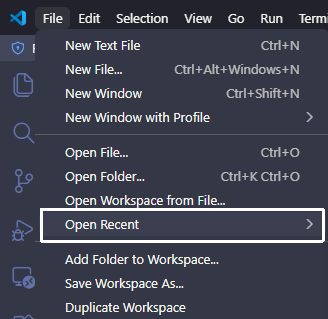
清理 VS Code「最近打开」列表中的无效记录
用 VS Code 时间久了,「文件 > 最近打开」列表会积累大量已删除或移动过的项目路径,点进去全是报错。网上流传的清理方法大多已过时——本文记录了在 VS Code 1.122+ 上找到正确存储位置的完整过程,以及最终可用的清理脚本。
传统方法失效
常见教程的做法是直接修改 SQLite 数据库:
%APPDATA%\Code\User\globalStorage\state.vscdb查询 key:
SELECT value FROM ItemTable WHERE key = 'history.recentlyOpenedPathsList'但在 VS Code 1.122 上执行后返回
None——这个 key 在这个路径下根本不存在。
逐步排查过程
1. 确认 User globalStorage 中没有该 key
列出
state.vscdb中所有 key,没有任何recent相关条目。2. 搜索所有 .vscdb 和 LevelDB 文件
workspaceStorage 目录下有数百个工作区数据库,Local Storage LevelDB 也无相关 key。
3. 在 storage.json 中找到文件夹历史
%APPDATA%\Code\User\globalStorage\storage.json中的profileAssociations.workspaces存储了所有打开过的文件夹路径与 profile 的对应关系,可以从这里删除不存在的文件夹记录。4. 在 workspaceStorage 中找到文件历史
每个工作区的
state.vscdb中history.entries记录了该工作区内曾打开过的文件路径,可以从这里批量清理。5. 最终发现:真正的「最近打开」列表
上面两步清理后,独立文件(直接用 File > Open File 打开、不属于任何工作区的文件)仍然出现在列表里。通过分析 VS Code 1.122 的主进程日志,找到了最终答案:
[shared storage] Creating shared storage database at
'~/.vscode-shared/sharedStorage/state.vscdb'
真正的存储位置是
~/.vscode-shared/sharedStorage/state.vscdb,这是 VS Code 的跨 profile 共享存储,包含完整的「文件夹 + 独立文件」全局最近打开列表,key 仍然是history.recentlyOpenedPathsList,只是搬到了这个新路径。
VS Code 存储结构(1.122+)
内容 文件 Key 全局最近打开列表(文件夹 + 文件) ~/.vscode-shared/sharedStorage/state.vscdbhistory.recentlyOpenedPathsList文件夹与 profile 关联 %APPDATA%/Code/User/globalStorage/storage.jsonprofileAssociations.workspaces工作区内文件编辑历史 %APPDATA%/Code/User/workspaceStorage/*/state.vscdbhistory.entries
版本变迁
VS Code 版本 存储位置 Key ~1.74 及以前 %APPDATA%/Code/User/globalStorage/storage.json(JSON)history.recentlyOpenedPathsList~1.75 ~ 1.121 %APPDATA%/Code/User/globalStorage/state.vscdb(SQLite)history.recentlyOpenedPathsList1.122+ ~/.vscode-shared/sharedStorage/state.vscdb(SQLite)history.recentlyOpenedPathsList版本节点为推测值,以实际行为为准。
清理脚本
完整脚本已开源,一键清理上述三个位置:
GitHub:sudoghut/vscode-clean-recent
运行方法
git clone https://github.com/sudoghut/vscode-clean-recent.git
cd vscode-clean-recent
python clean_vscode_recent.py
或在 Windows 下避免编码问题:
cmd.exe /c "chcp 65001 >nul && set PYTHONIOENCODING=utf-8 && python clean_vscode_recent.py"注意事项
- 先关闭 VS Code,否则 VS Code 退出时会覆盖修改
- 脚本会自动备份所有修改的文件
- Remote SSH / WSL 路径不会被删除
结果
脚本在测试机上:
- 全局最近打开列表:806 条 → 删除 427 条无效,保留 379 条
- 文件夹 profile 关联:338 条 → 删除 190 条无效,保留 148 条
- 工作区文件历史:扫描 477 个数据库 → 删除 1325 条无效记录,保留 2002 条
重启 VS Code 后「最近打开」列表彻底干净。
-
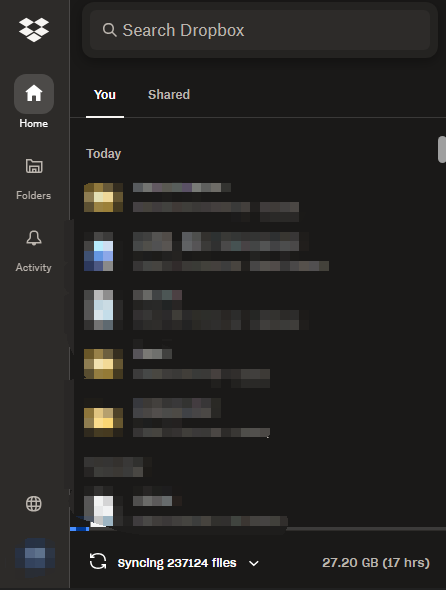
Dropbox 的 Smart Sync 触发自动故障导致磁盘空间被迅速消耗完的问题
Dropbox 的 Smart Sync 功能允许用户将文件设为”仅在线”以节省本地磁盘空间。然而,Dropbox 客户端在重新启动时(例如系统从睡眠唤醒、客户端更新或手动重启),有时会将大量文件夹的 Smart Sync
策略从”仅在线”批量重置为”下载到本地”,触发数万个文件的大量下载,迅速耗尽磁盘空间。这一行为并非用户误操作,而是 Dropbox 客户端的已知问题。当这种情况发生时,在 Dropbox 正在执行批量下载的过程中,直接通过右键菜单将文件夹设为”Make available online only”往往无效,因为父级文件夹的策略优先级更高,且 Dropbox 的下载队列在重启后仍会持续执行。
有效的解决方法是:完全退出 Dropbox 客户端,然后用 SQLite 工具打开本地数据库文件 smarter_smart_sync.dbx(位于 AppData\Local\Dropbox\instance1\),执行 UPDATE scan_history SET folder_policy=NULL WHERE folder_policy=1
将所有被重置的下载策略清除。操作前建议先备份该文件。清除后重新启动 Dropbox,立刻暂停同步,再对 Dropbox 根目录执行一次”Make available online only”,然后恢复同步,Dropbox 便会开始删除本地副本、释放磁盘空间,而不再重新下载。为避免此问题,建议对于不需要本地存储的超大文件夹改用 Selective Sync(选择性同步)而非 Smart Sync,因为 Selective Sync 将文件夹完全排除在本地之外,不受策略重置的影响,稳定性更好。此外,也建议在磁盘上保留足够的余量,以便在策略意外重置时有足够时间发现并处理。
-

圣诞假补完链锯人蕾塞篇
前段,男频 yy 恋爱剧嘛,有什么好看的。中段,哇,分镜!音乐!节奏!适合圣诞的打斗爆米花番! 过度到结尾之前:有些事既正确又恶心,那么就愉快地不要恶心自己!结尾:价值观冲突时,「子弹的批判」总是适合悲剧。权力/暴力决定结局,也算是当下文化的写实。豆瓣 9.1, 真不错。
原作藤本树:「原作中让帕瓦最后登场是为了过渡到下一章,但拍成电影我也想过,结束时是否有必要让她出场。不过多亏她最后阳光的声音,能让自己心情愉悦地走出电影院。」你也知道吖! -
VSCode 中文折行不完全
在 VSCode 中安裝了主題和字體之後,開啟折行時,有時會出現折行後仍然有一部分內容需要透過水平滾動條顯示的狀況。
這時候可以進入 VSCode 的設置,檢索”Wrapping Strategy”, 把它設置為 advanced 即可。